


UI Action Basics
On this page
In this lesson, you will learn:
- What a UI action is
- The key fields on a UI action
- How to build a simple “Assign to me” button
1 Buttons that do things
Every button you click on a form, like Update, Resolve, or Delete, is a UI action. You can make your own! SNWR agents want a one-click Assign to me button. 🖱️
Key term: UI action
A button, link, or menu item on a form or list that runs a script when clicked. Stored in the sys_ui_action table.
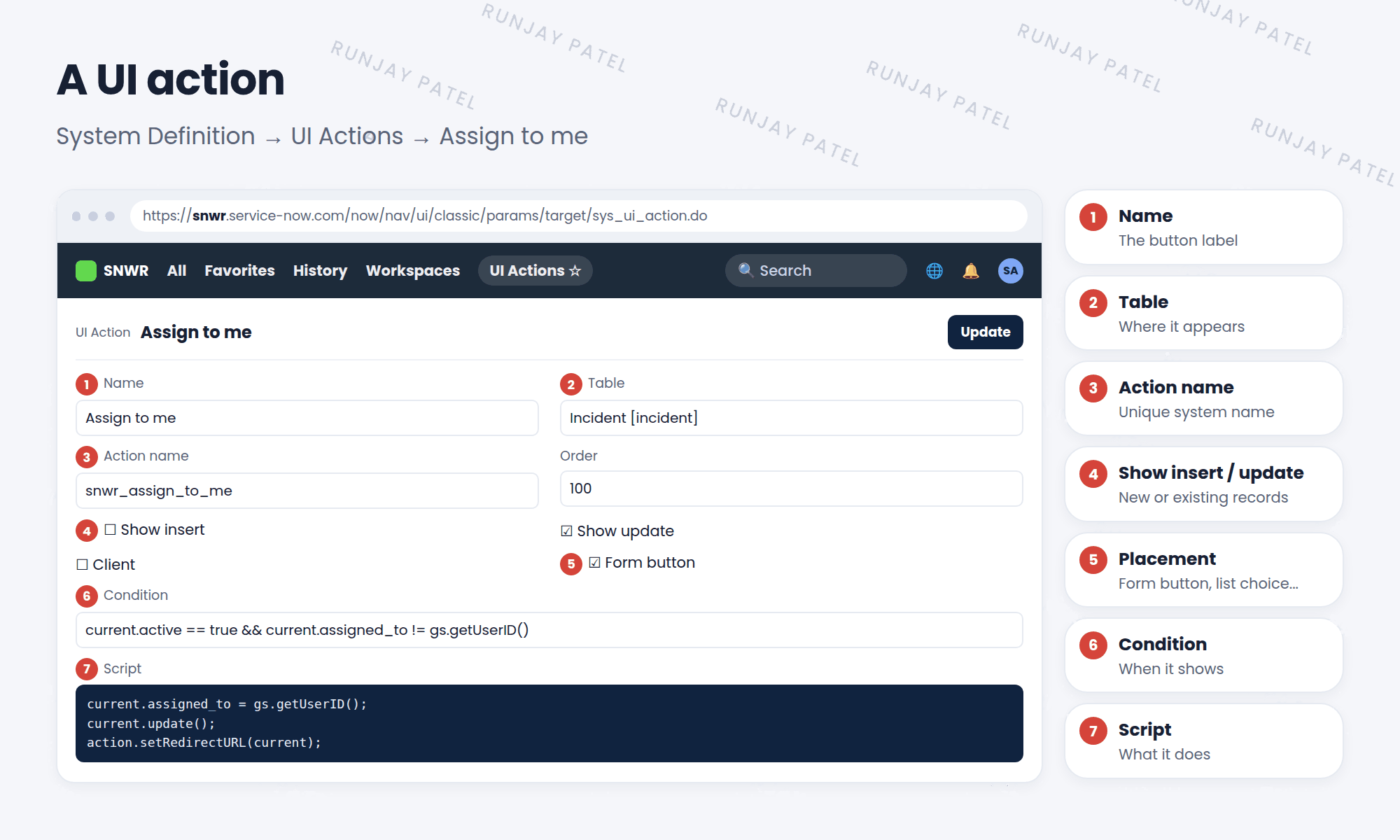
2 Key fields
| Field | What it does |
|---|---|
| Name | The text on the button or link |
| Table | Which table it appears on |
| Action name | A unique system name, used by scripts |
| Order | Its position among other buttons |
| Show insert / Show update | Show it on new records, existing records, or both |
| Client | Runs in the browser instead of on the server (Lesson 38.4) |
| Form button, List choice, … | Where it appears (Lesson 38.2) |
| Condition | When it appears (Lesson 38.3) |
| Script | What happens when it’s clicked |
3 The script
By default, a UI action runs on the server, so you can use current, the record on the form.
current.assigned_to = gs.getUserID();   // me!
current.update();                         // save the record
action.setRedirectURL(current);           // stay on this record
💡 Good to know: Want to see how the built-in buttons work? Right-click the form header and choose Configure > UI Actions, then open one, like “Resolve Incident”.
⚠️ Heads up: Don’t edit built-in UI actions. Copy one with Insert and Stay and change your copy, so upgrades don’t overwrite your work.
⭐ Remember: UI action = name + table + where it shows + when it shows (condition) + what it does (script).
4 Let’s try it: Assign to me
- Go to System Definition > UI Actions and click New.
- Name: Assign to me. Table: Incident. Action name:
snwr_assign_to_me. - Check Show update and Form button. Uncheck Show insert.
- Paste the script above. Submit.
- Open an incident that’s assigned to someone else. Click Assign to me. Are you now the assignee?
5 Quick recap
- A UI action is a button, link, or menu item
- It lives in
sys_ui_action - Key parts: Name, Table, Action name, where it shows, Condition, Script
- Server scripts use
currentand oftenaction.setRedirectURL() - Copy built-in actions instead of changing them
6 Check yourself
Think of your answer first. Then tap to check.
1 Which table stores UI actions? Show answer
sys_ui_action.
2 You want the button only on existing records. Which checkbox do you use? Show answer
Show update (and uncheck Show insert).
3 In a server-side UI action, what object is the record on the form? Show answer
current.
Nice work! You finished this lesson. 🎉
Was this lesson helpful?
Please log in to share lesson feedback.
Have a question or doubt?
Ask here and get help from instructors and fellow learners.
Only logged-in learners can post.





