


Reference Fields & sys_id
On this page
In this lesson, you will learn:
- What a reference field is
- Why a reference field stores a sys_id, not a name
- What the display value is, and how to preview a referenced record
1 A field that points to another record
On an incident, the Caller field shows “Riya Sharma”. But Riya isn’t really stored on the incident. Her details live in the User table. The Caller field just points to her user record. 👉
Key term: Reference field
A field that links one record to a record in another table. Caller on Incident references the User table (sys_user).
2 What’s really stored: the sys_id
Every record has a unique 32-character ID called the sys_id (Lesson 29.1). A reference field stores the referenced record’s sys_id, not its name.
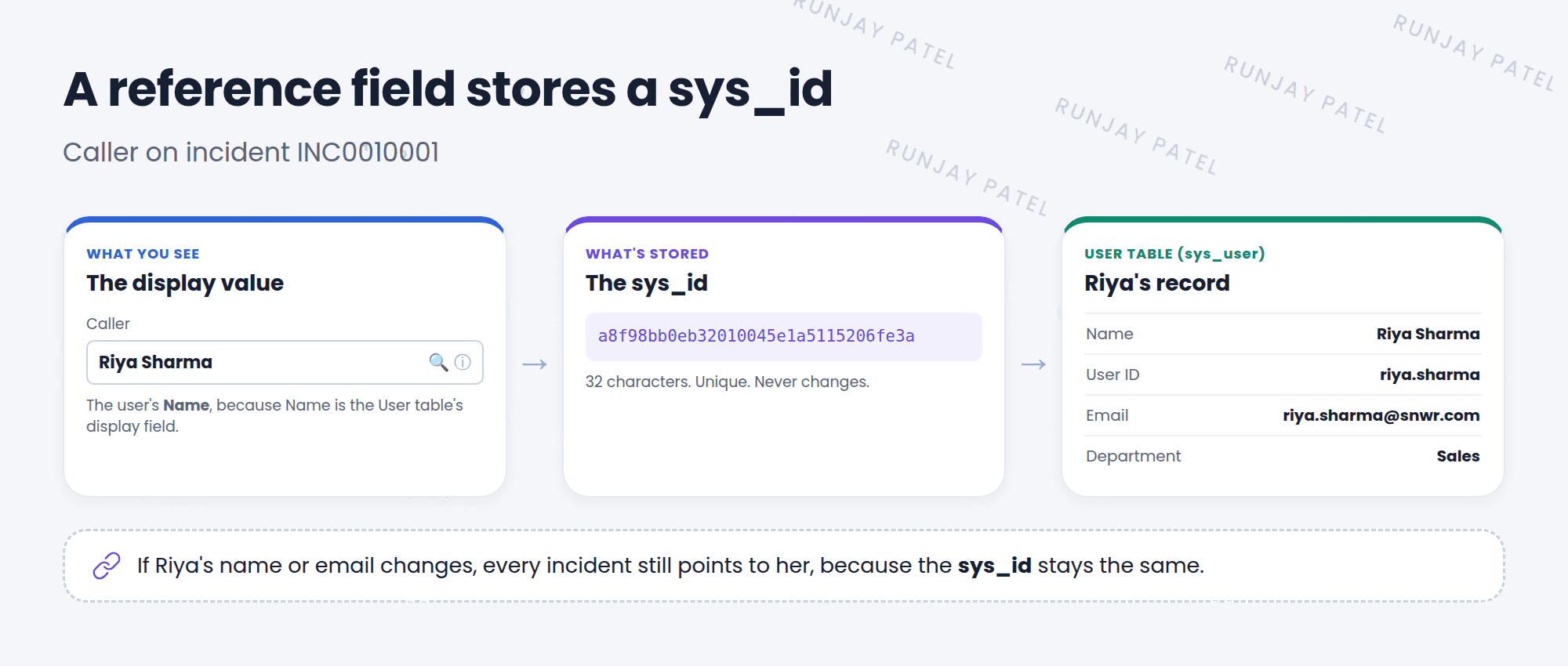
💡 Good to know: Why store a sys_id? If Riya changes her name or email, every incident still points to the right person. Nothing needs fixing!
3 The display value
Key term: Display value
The field that’s shown in place of the sys_id. For users it’s the Name. For incidents it’s the Number. Each table has one display field, set with the Display checkbox in the dictionary.
| Table | Display value | Example |
|---|---|---|
User (sys_user) |
Name | Riya Sharma |
Group (sys_user_group) |
Name | SNWR Service Desk |
Incident (incident) |
Number | INC0010001 |
⚠️ Heads up: Don’t change a table’s display field without a good reason. Every reference to that table, on every form and list, will show the new field.
4 Previewing a referenced record
- Click the ⓘ (preview) icon next to a reference field to see a quick pop-up of the record.
- From the pop-up, click Open Record to go to the full record.
- Click the 🔍 (lookup) icon to search and pick a different record.
⭐ Remember: A reference field stores a sys_id and shows a display value.
5 Let’s try it: peek behind the name
- Open any incident. Click the ⓘ icon next to Caller. What details do you see?
- Right-click the Caller label and choose Configure Dictionary. Check the Type (Reference) and the Reference table (User).
- In the filter navigator, type
sys_user.listand press Enter. Open a user, right-click the header, and choose Copy sys_id. That’s what the Caller field stores.
6 Quick recap
- A reference field links a record to a record in another table
- It stores the other record’s sys_id
- It shows the display value, like a name or number
- Each table has one display field
- Use the ⓘ icon to preview the referenced record
7 Check yourself
Think of your answer first. Then tap to check.
1 What value does the Caller field actually store? Show answer
The sys_id of the user record.
2 Why does an incident reference show “INC0010001” and not a long ID? Show answer
Number is the display value for the Incident table.
3 A user changes their name. Do old incidents still point to them? Show answer
Yes. The reference stores the sys_id, which never changes.
Nice work! You finished this lesson. 🎉
Was this lesson helpful?
Please log in to share lesson feedback.
Have a question or doubt?
Ask here and get help from instructors and fellow learners.
Only logged-in learners can post.





