


Import Sets & Staging Tables
On this page
In this lesson, you will learn:
- What an import set and a staging table are
- Why data lands in staging first
- How to read an import set’s row states
1 A waiting room for data
Imported data doesn’t go straight into the User table. It waits in a staging table first, exactly as it came in. That gives you a chance to check it before it touches real records. 🛋️
Key term: Import set table (staging table)
A table that holds imported rows as-is. Every column in the file becomes a string field, like u_first_name. It extends sys_import_set_row.
Key term: Import set
One load of data, like “Monday’s new-hire file”. It groups the rows loaded at the same time and tracks their state.
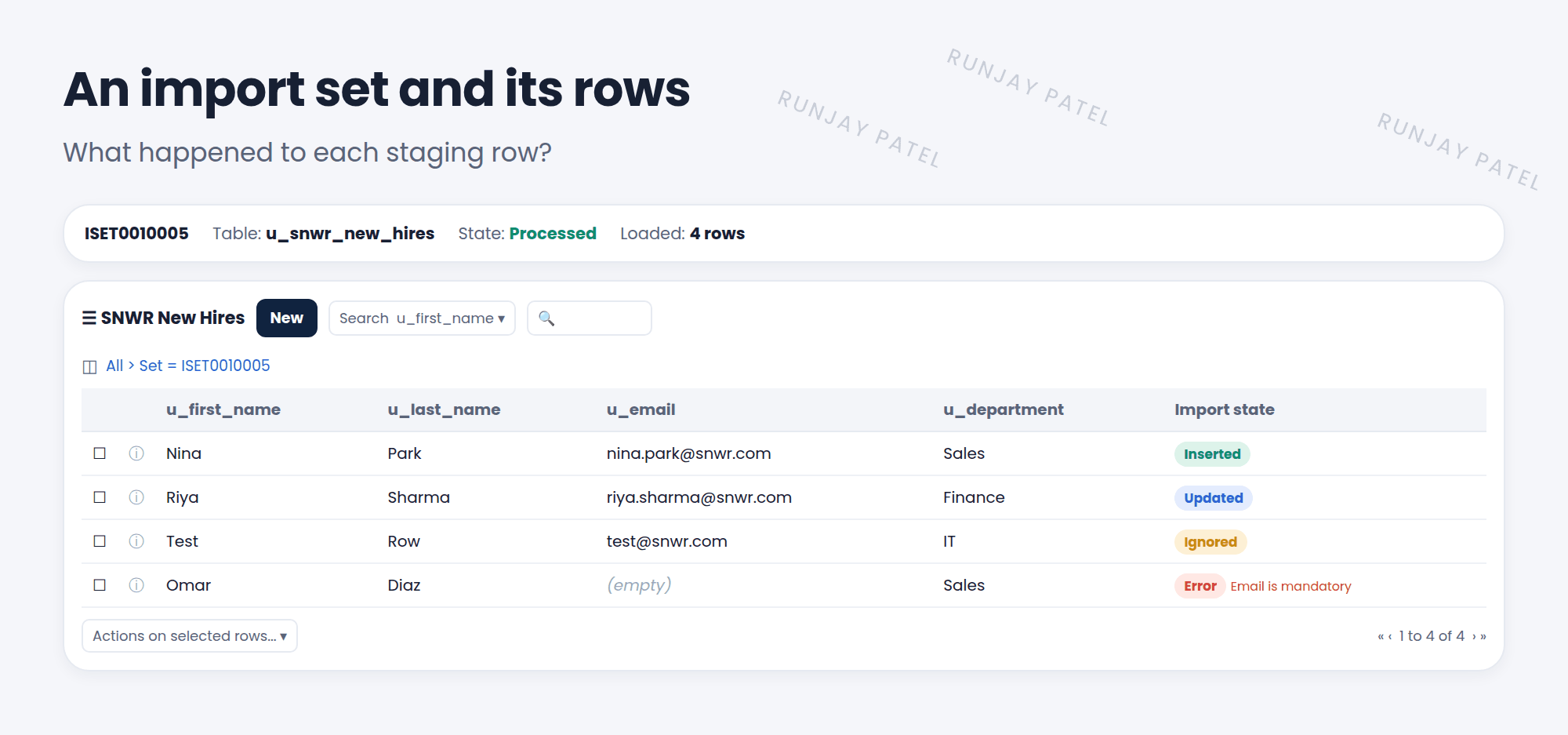
2 Row states
| Import state | Means |
|---|---|
| Pending | Loaded, not transformed yet |
| Inserted | Created a new target record |
| Updated | Changed an existing target record |
| Ignored | Skipped on purpose, often by a script |
| Skipped | No changes were needed, or it couldn’t be matched |
| Error | Something went wrong. Read the comment on the row |
3 Where to look
- System Import Sets > Advanced > Import Sets: every load, with its state (Loaded, Processed).
- Open an import set to see its rows and the transform history.
- Transform History shows each run’s start and end time, and counts of inserts, updates, and errors.
📝 Note: Staging rows don’t stay forever. A scheduled job, the Import Set Deleter, cleans up old import sets after a few days.
💡 Good to know: Reuse the same staging table for the same kind of file every time. Then your transform map works on every load.
⭐ Remember: Data lands in the staging table first. Each row’s import state tells you what happened.
4 Let’s try it: inspect your load
- Open System Import Sets > Advanced > Import Sets. Find the import set from Lesson 43.1.
- What’s its state? Open it and look at the rows.
- Look at the column names in the staging table. Do they start with
u_? - What’s the import state of each row right now? (They should be Pending until you transform.)
5 Quick recap
- An import set table (staging) holds imported rows as-is
- An import set is one load of data
- Row states: Pending, Inserted, Updated, Ignored, Skipped, Error
- Check Transform History for totals and errors
6 Check yourself
Think of your answer first. Then tap to check.
1 Why does imported data go to a staging table first? Show answer
So it can be checked and transformed before it changes real records.
2 A row’s state is Inserted. What happened? Show answer
It created a new record in the target table.
3 Which table do all staging tables extend? Show answer
sys_import_set_row.
Nice work! You finished this lesson. 🎉
Was this lesson helpful?
Please log in to share lesson feedback.
Have a question or doubt?
Ask here and get help from instructors and fellow learners.
Only logged-in learners can post.





