


Current & Previous Objects
On this page
In this lesson, you will learn:
- What current and previous hold
- How to check if a field changed
- When previous is empty
1 Now and before
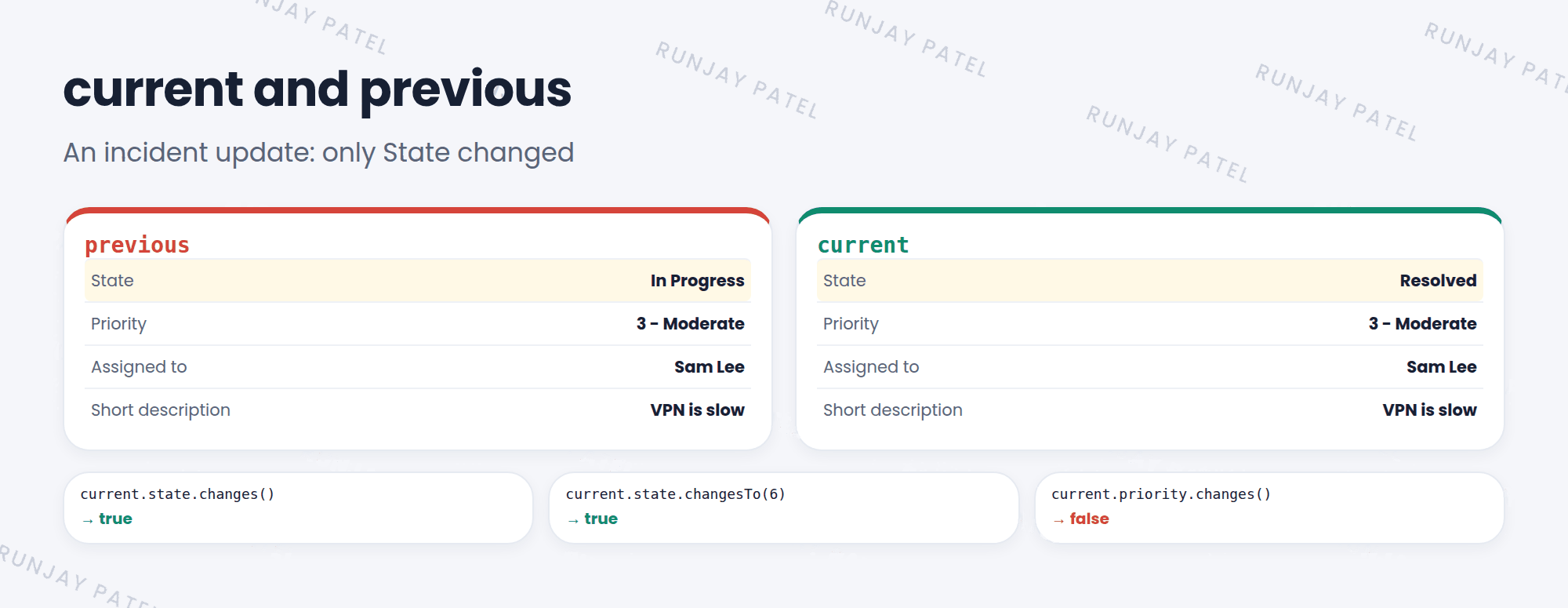
In a business rule, you get two versions of the record. current is the record as it’s being saved. previous is the record as it was before this change. Comparing them tells you what changed. 🔍
2 Checking for changes
| Method | True when… |
|---|---|
current.state.changes() |
State changed at all |
current.state.changesTo(6) |
State changed to 6 (Resolved) |
current.state.changesFrom(2) |
State changed from 2 (In Progress) |
current.state != previous.state |
The same idea, done by hand |
current.operation() |
Returns ‘insert’, ‘update’, or ‘delete’ |
(function executeRule(current, previous) {
  if (current.state.changesTo(6)) {        // just resolved
    gs.info(current.number + ' resolved by ' + gs.getUserName());
  }
  if (current.assigned_to.changes() && !previous.assigned_to.nil()) {
    current.work_notes = 'Reassigned from ' + previous.assigned_to.getDisplayValue();
  }
})(current, previous);
💡 Good to know: You can put these checks in the Condition field on the Advanced tab, like current.state.changesTo(6). Then the script only runs when it matters.
3 When previous is empty
| Situation | previous |
|---|---|
| Insert (new record) | Empty. There was no “before” |
| Update in before or after rules | ✅ The old values |
| Async rules | ❌ Not available (null) |
| Display rules | Not useful. Nothing is changing |
⚠️ Heads up: Using previous in an async rule causes errors. If an async rule needs old values, save them in a field (or an event, Chapter 41) first.
⭐ Remember: current = new values. previous = old values (updates only, not async). Use changes(), changesTo(), changesFrom().
4 Let’s try it: log reassignments
- Create a business rule on Incident: SNWR log reassignment. When: before. Update: checked. Advanced: checked.
- Condition:
current.assigned_to.changes() - Paste the script above. Submit.
- Open an incident assigned to Sam Lee. Change Assigned to, then save. Check the work notes. Do you see “Reassigned from Sam Lee”?
5 Quick recap
currentholds the new values being savedpreviousholds the values before this updatechanges(),changesTo(),changesFrom()spot changespreviousis empty on insert and null in async rules
6 Check yourself
Think of your answer first. Then tap to check.
1 Write a condition that’s true only when priority changes to 1. Show answer
current.priority.changesTo(1)
2 On an insert, what does previous hold? Show answer
Nothing useful. There were no old values.
3 Can you use previous in an async business rule? Show answer
No. It’s not available in async rules.
Nice work! You finished this lesson. 🎉
Was this lesson helpful?
Please log in to share lesson feedback.
Have a question or doubt?
Ask here and get help from instructors and fellow learners.
Only logged-in learners can post.





